Harappa is a free, open-source Blender add-on that builds an anime-style meadow in one click
Tokyo AI Visuals released Harappa, a GPL add-on that grows painted grass, flowers, trees and a cel-shaded sky for anime-style backgrounds in EEVEE. Version 1.2, out this week, adds ponds, streams, waterfalls and weather.
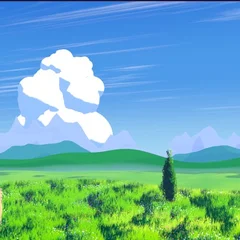
Harappa is a new, free Blender add-on for one very specific job: the hand-painted meadow you see behind characters in anime films. Click Make Anime Meadow and it lays down grass, flowers, a painted sky, clouds, far hills, a key sun and a camera. A second click plants trees.
Its maker, Tokyo AI Visuals (the GitHub account is KanaWorks_AI), announced it on November 14. The code is on GitHub under GPL-3.0-or-later, and the team says it’s their fifth Blender add-on. The first build, 1.0.0, went up on GitHub on November 10, and the project has moved fast since: 1.1.0 on November 12, then 1.2.0 and 1.2.1 on November 16.
What it makes
The README credits Trung Duy Nguyen’s anime grass and tree tutorials as an influence and says all of Harappa’s nodes and code were written from scratch.
- Grass that reads as paint. Each tuft sways in a two-layer wind, and light and shadow fall in big shared clumps that follow the sun, the way a background painter blocks them in.
- Trees in nine shapes, including cherry blossom, Japanese pine, willow and poplar, made of brush-dab leaf cards.
- Six seasons and four styles. Summer Meadow, Spring Blossom, Golden Hour, Autumn Leaves, Moonlit Night and Misty Morning, each in Anime Background, Painterly, Crisp Cel or Soft Pastel. A Shuffle button re-rolls tree shapes, clouds, flower colors and the sun angle.
- Room for your characters. Since 1.1 you can paint paths, flower beds and tall grass with Blender’s own brush, and tell the grass to grow around a character so no blades poke through the model.
New in 1.2
The 1.2 release, called “Waterside & Weather,” adds ponds, streams, waterfalls and rocks. According to the release notes, water follows the ground: a pond fills to the lowest point of its rim and spills out there, and a waterfall’s plunge pool is dug into the slope. There are also water lilies, reeds, koi and a rowboat, plus Rain and Storm weather layers, a rainbow, fireflies and dragonflies.
A Grass Only in Camera View option grows grass and flowers only where the camera sees. The developers say the picture doesn’t change and the grass count drops to between a half and a fifth. Version 1.2.1 fixes a bug that made the water stand still on the timeline.
Getting it
Harappa needs Blender 5.0 or newer with EEVEE, and the notes say it’s tested on 5.2 LTS and 5.3. Download the zip from the releases page and use Install from Disk in Blender’s Get Extensions preferences. The panel works in English, Japanese, Simplified Chinese and Korean. An AGENTS.md file lets a coding agent install it, but that’s optional.
Renders you make are yours to use commercially, with no credit required. If you redistribute or modify the add-on itself, the project asks you to keep its attribution line, as an extra term under GPLv3.
We haven’t tested it yet. For anime-style shorts and storyboards, it looks like a quick way to get a backdrop.
Sources: Tokyo AI Visuals announcement, Harappa on GitHub (README in English), release notes.
Thumbnail: KanaWorks_AI / Tokyo AI Visuals, Harappa README before-and-after image (cropped)